The following Java program is developed under Linux using a text editor and the command line. The process on other operating system should be similar, but is not covered in this description.
Select or create a new directory which will be used for your Java development. In this description the path \home\vogella\javastarter is used. On Microsoft Windows you might want to use c:\temp\javastarter. This path is called javadir in the following description.
Open a text editor which supports plain text, e.g., gedit under Linux or Notepad under Windows and write the following source code.
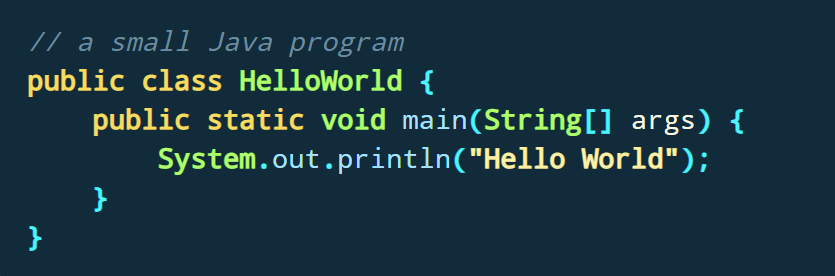
Save the source code in your javadir directory with the HelloWorld.java filename. The name of a Java source file must always equal the class name (within the source code) and end with the .java extension. In this example the filename must be HelloWorld.java, because the class is called HelloWorld.
Open a shell for command line access.
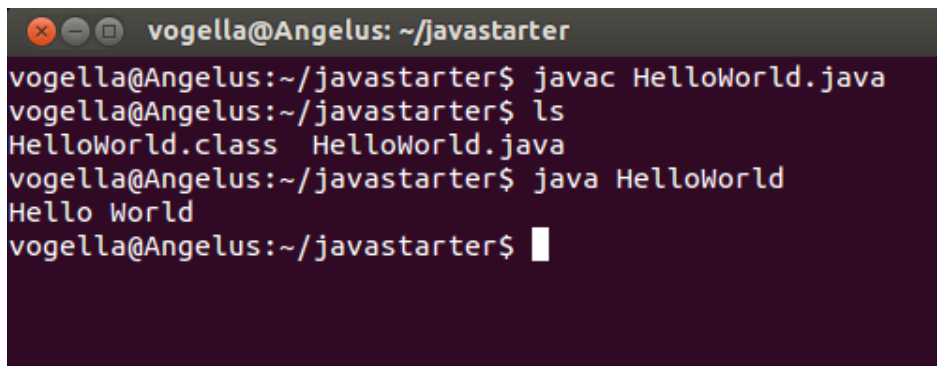
Switch to the javadir directory with the command cd javadir, for example, in the above example via the cd \home\vogella\javastarter command. Use the ls command (dir under Microsoft Windows) to verify that the source file is in the directory.
Compile your Java source file into a class file with the following command.

Afterwards list again the content of the directory with the ls or dir command. The directory contains now a file HelloWorld.class. If you see this file, you have successfully compiled your first Java source code into bytecode.
You can now start your compiled Java program. Ensure that you are still in the jardir directory and enter the following command to start your Java program.

The system should write "Hello World" on the command line.
You can use the classpath to run the program from another place in your directory.
Switch to the command line, e.g., under Windows Start
If you are not in the directory in which the compiled class is stored, then the system will show an error message: Exception in thread "main" java.lang.NoClassDefFoundError: test/TestClass
To use the class, type the following command. Replace "mydirectory" with the directory which contains the test directory. You should again see the "HelloWorld" output.
